
Parental Control Cell Phone Tracker
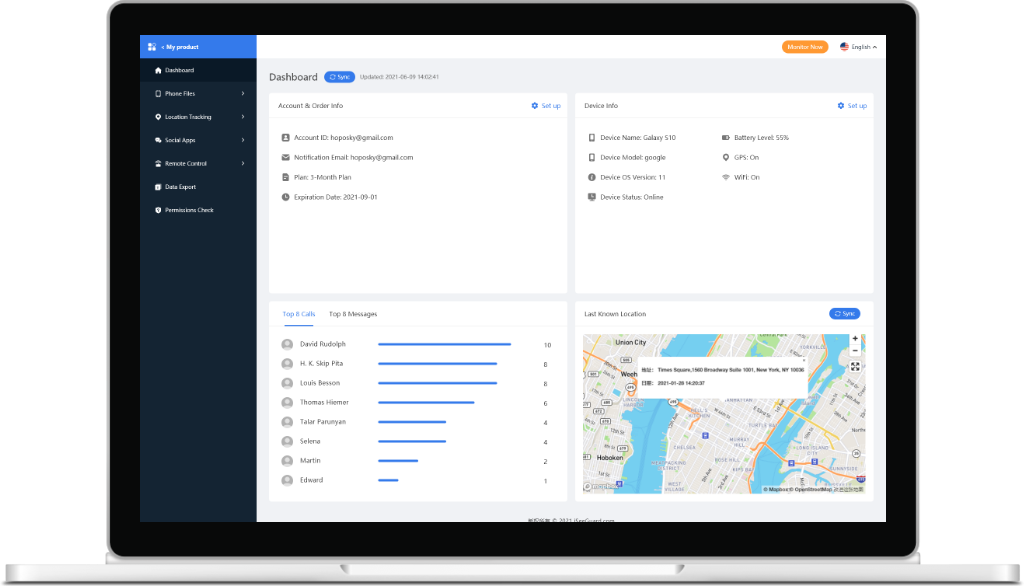
iSeeGuard is one of the best phone tracker app without permission that you can use to privately and safely monitor your child’s phone activity remotely! Track phone calls, messages, and more through your web browser. iSeeGuard is also safe and private, which means your data will never be leaked.
Featured On


Oversee Everything From Your Web Browser
With iSeeGuard you can easily set up and control everything from the browser of your choice to watch over a phone or a tablet. Once the cell phone monitor software is working, you will receive updates straight onto your online dashboard, viewed from your browser without them knowing.
Use iSeeGuard without Root and Jailbreak
Root and jailbreak can expose the device to various problems and is lead to a loss of warranty. For Android, iSeeGuard uses a small download done in minutes, while the iOS version is fully web-compatible so that you can install it within seconds.
Cover Everything
Contacts
See their contacts and save their names and addresses.
SMS Reader
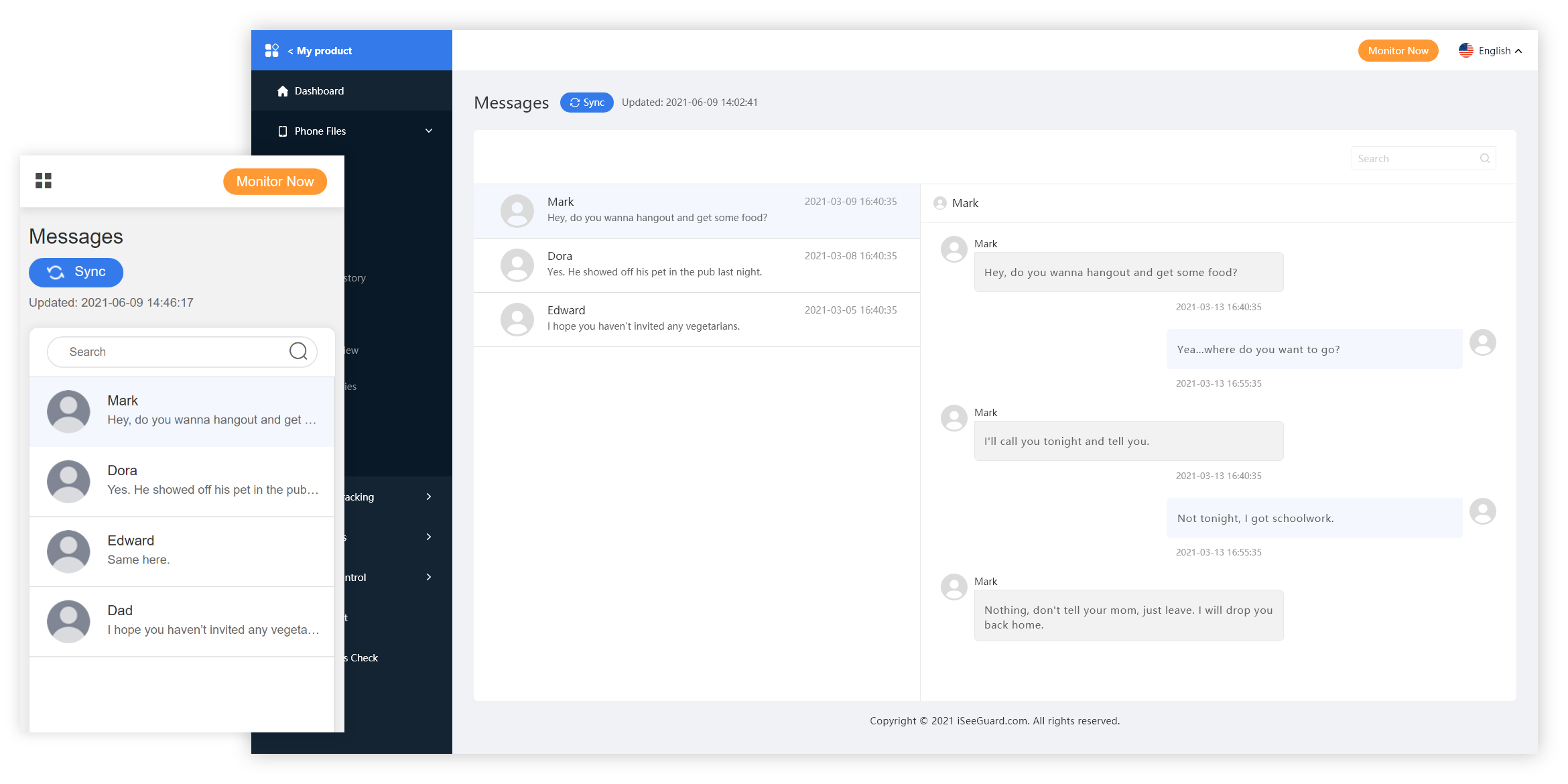
Read everything from their SMS, iMessages, and social media messages, including Snapchat.
Track Calls
Know everything about their call logs, like the contact names, arriving calls, and timestamps.
Geofence
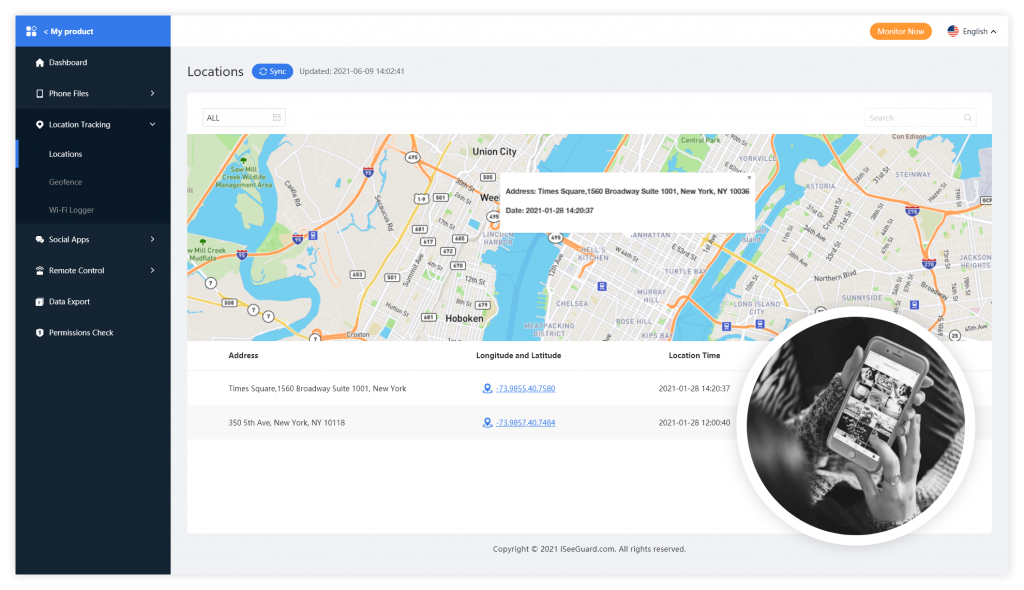
Create a virtual perimeter that when the user leaves it, you get notified.
Browser History
See their favorite sites, how frequently they visit the site and save it.
Stealth mode
Complete invisible mode for monitoring.
What People Are Saying

I never thought I would have to resort to using a monitoring app for my 12-year-old, but I’ve decided to go with the best. iSeeGuard is excellent for following my child when he’s out for football practice, so I don’t need to worry about it too much. Highly recommended!
– Cynthia, US

how to track a phone without permission?As an upcoming businessman, knowing what my workers are doing behind my back in the company is essential, so I know how to keep morale and productivity high. And if any of my employees try to make a deal with a competitor company, I can see about it and make proper changes.
– Adam Cheise

If you’re worried about giving your child a phone at a young age, don’t be. Just install this app before giving it to them,track cell phone without permission and you will know everything you want to, and if they are up to no good, you can take the phone away in time.
– Floyd Staller

Excellent, no messy ads, the page is also straightforward, the use is not stuck, very smooth, the function is also very comprehensive, it is worth recommending~
– Marina
10 Best Phone Tracking Apps To Track On Your Kids Without Permission
Kids today are extremely smart and tech-savvy. Gone are the days when they used to go out to the playground to play sports; these days, they are mostly found busy and engaged with their smartphones. Since you, as a parent, never know why your child might be using their phone, it indeed becomes a matter of concern. Moreover, since every piece of information is readily available online, you should be bothered about your kid’s online activities.
Kids know how to remove unacceptable applications from their devices, delete search history from their mobile browsers, and even keep their phones locked so that no one gains access to it. So, what to do when your child is this smart? You know that smartphones are a necessity, and you have to give your child one to learn about their whereabouts when they are not at home. So, the only way to keep track of your child’s online activity is by getting a robust cell phone tracker app that will let you keep an eye on their phone. Knowing there are a plethora of phone track apps popping up now and then, this article will help you with the top ten phone tracker apps that you can try. But after reading this article and downloading cell phone tracker software on your child’s phone, it is better to let your child know about the same. The reason being, your child shouldn’t feel that you are jeopardizing their privacy. So, let’s get started with the list of ten cell phone tracking apps that you can consider trying. The first on the list is iSeeGuard. This phone monitoring app is available for iOS and Android operating systems. Being one of the best cell phone monitoring apps, you can use it to conveniently monitor your child’s phone whenever you want. Plus, the tracking and monitoring will be done remotely. This robust app will send alerts and updates about your child’s smartphone directly on the online dashboard. Plus, you can set up everything and watch over your kid’s phone easily. Some of the impressive features offered by iSeeGuard are- see the contact list so that you can save unknown people’s names and other details, look and read text messages, social media messages, iMessages, and more, track calls everything and find out information about who your child is calling and who is calling them, receive contact names, learn about the timestamps and also arriving calls, receive notifications for tracking incoming and outgoing. You will also be able to create a geofence. Geofence is basically a virtual perimeter that you can set up, and whenever your child crosses that, you will receive an alert about the same. Along with this, iSeeGuard allows you to browse history and monitor everything in an invisible mode. When your child is late for home after a party, you can easily track where they are. In addition to everything, if you face any problem using iSeeGuard or want to learn more about the features, you can contact their 24×7 customer service. Price Basic- $49.99 per month The Pros Tons of impressive features. The Cons The price could be a little expensive for some. FlexiSPY is another reliable mobile phone monitoring application. This app will let you monitor a phone seamlessly. It offers advanced-level features, such as capturing videos and photos, call recording, listening to surrounding sounds, and more of the target device. This cell phone monitoring software will also alert you when the target device has a change of SIM card. Not just this, you will get access to the call logs, keylogger, and more. Moreover, you will be able to check the recent apps that your child has recently used. If you want to know how your child uses his or her mobile phone, FlexiSPY could be a good option for you. One impressive feature about this mobile monitoring app is that once you gain access to the target device, you can even record video of their surroundings as well. Some of the advanced features will be available in the highest paying subscription, though. Price Lite- $29.95 per month Pros It allows you to have total control of the target device. Cons It is incredibly pricey. One of the most popular phone monitoring apps is mSpy. This phone tracking software will let you gain access to every video and image saved on the target smartphone. If you want, you can even read the chats shared back and forth on different social media platforms, such as Tinder, Facebook, Snapchat, Instagram, and more. Along with everything, you can track where your child currently is using the GPS location feature. It also comes with the geofencing feature, which will let you create a virtual boundary and alert you when the target device crosses that. Other excellent features are keylogger, website bookmarks check, gain access to incoming and outgoing emails, and much more. Plus, the cost for mSpy is not exorbitant. Price Android Basic- $8.33 per month Pros One of the leading Android and iPhone monitor software. Cons Only one device can be monitored. The best part about Spyic is that it allows you to monitor mobile phones offline and online. And that’s its most significant advantage. With the galore of features, Spyic provides, now monitoring your kids’ activities will become easy. Just like all the spying software, it also lets you track GPS, check call logs of the target Android devices, learn about the incoming and outgoing messages and calls, and receive real-time updates about your child’s physical location. Not just this, you can use Spyic to monitor your child’s social media presence and online activities. When it comes to using Spyic, you can quickly start monitoring by following the step-by-step instructions the tool shows. This monitoring tool is available for both iOS and Android devices. You just need to download it on the handset and select the target device you want to monitor. Once you are logged in, you will be taken to the control panel, where your monitoring journey will begin. Price Android Premium- $9.99 per month Pros Tracking the target device is done precisely. Cons The app crashes sometimes. If you want to know about the outgoing phone calls your child makes, you can try Spyfone. This one of the best phone monitoring apps is available for iOS and Android. So, you can target their phone without worrying about the OS. This software will let you access the phone logs, Instagram, WhatsApp, contacts, photos, and more. Along with this, you will find some essential information about the mobile phone also, such as OS version, root status, IMSI number, etc. Both incoming and outgoing phone calls can be monitored. In addition, there is a play option, which will enable you to listen to the phone calls, read text messages, check what is stored in the SD card, find out about their current GPS location, set geofencing, learn about the most used apps on the phone, app usage, web history and blocking, keylogger facility is available, live screen streaming, control apps, send remote commands, and much more. Price Basic- $4.17 per month Pros It is affordable. Cons The text command feature may not work correctly. Another good phone tracking software to keep track of online activities is iSpyoo. Since the online world is perilous for everyone, iSpyoo turns out to be a suitable phone monitoring device, which will allow you to safeguard your child from online bullying, visiting unsafe websites, watching unacceptable content, and more. Some of the features of iSpyoo are- call monitoring, video calls monitoring on Skype and Viber, location tracking, view call logs, read text messages, view photos and videos, view contacts, check web browsing history, outgoing and incoming mails, and IM chats. The good thing about iSpyoo is that it offers you a free trial so that you can decide whether you want to go with this phone monitoring and tracking software or not. With one account, you will be able to monitor three devices remotely. iSpyoo is available for both iOS users and Android users. Price Basic- $19.99 per month Pros A full version free trial for 48 hours is available. Cons To use it on iPhone, you will have to jailbreak. SpyBubble is a phone tracking app for iOS, Windows, and Android. This easy-to-use phone tracking app needs to get installed to get started. And yes, you can expect all the top features from SpyBubble that you will find in the leading phone tracking apps. Being a cloud-based phone monitoring app, using SpyBubble becomes extremely easy. Some of the features that SpyBubble will impress you with- call tracking, media files, chats, read texts, WhatsApp and Facebook messages, emails, remotely activate the camera and capture images, capture keystrokes, and much more. The best part about SpyBubble is that this app remains invisible, which means even if the app gets installed, no one will be able to find it out. You don’t need to get close to the target device to monitor it; everything will be done remotely. You simply need to log in and get started. Also, new data gets synced every five minutes in this tracking tool. Price Personal Plan- $24.95 per month Pros It offers many monitoring features. Cons Most of the devices have to be rooted. To protect your child’s phone from spyware, you can give Minspy a try. This phone monitoring app is pretty old and has been around for some time now. Whether you want to target an iOS or Android device, it accepts both. The web-based interface allows you to keep an eye on the target device conveniently from the web browser. The location-tracking features of Minspy are impressive. It lets you do real-time tracking, view maps in 3D, offers impeccable geofencing support. It not only enables you to track on a smartphone, but Minspy can track computers and tabs also. You don’t have to jailbreak or tinker to get started. Also, even if you don’t have any technical knowledge, Minspy’s step-by-step instructions will help you get through the setup and installation process. This simple phone tracking app comes with essential phone tracking features, such as monitoring calls, tracking GPS location, reading text messages, tracking online activity, SIM logger, and more. Price Premium- $9.99 per month Pros You can monitor everything in stealth mode. Cons Target phone should have an internet connection, else, Minspy won’t work. MobiStealth is an excellent and simple monitoring tool that will let you easily monitor any smartphone. From checking browsing history, GPS locations, and call logs to learn about your child’s conversations with other people, MobiStealth lets you monitor in stealth mode. Once you download and install MobiStealth on the target mobile, it will remain hidden from them, and you can start tracking it whenever you want. Although mostly it’s the parents who use this monitoring tool, its features can be pretty valuable for business people to keep an eye on their staff when they are on duty. It doesn’t have many advanced features, but the basic features are good enough to learn about the target device. Other features are learning about the target device’s social media activity, track messages, monitor cell phone activities, and more. Price Pro Plan- $59.99 per month Pros Completely invisible. Cons No free trial is available. uMobix is a new entry into the market of phone monitoring apps, but the reason why it has been added to the list is it has proved to be an excellent competitor to all the top-notch phone monitoring applications. Even though it is new, it comes along with fantastic features. You can use it to track messages, calls, videos, photos, contact, and locations. Basically, it has all the standard features that you will expect from a good monitoring app. The main highlight of uMobix is its keystrokes feature. You can check everything remotely without letting the other person know. The keystrokes will be shown along with the time and date stamp. uMobix will let you gain access to the target device easily. If you want, you can even take screenshots of WhatsApp, Snapchat, Instagram, Facebook, and other apps to understand what your kid is doing online. Also, web browsing tracking is available with incognito web history. Price For Android For Mac Pros It lets you browse the history of the incognito tab. Cons Social media updates need some work. Conclusion So, all the phone monitoring apps you can see here are the best ones to go for. Whether you want phone monitoring software for Android or iOS device, you can get any one of them and get started. Plus, these phone tracking apps will stay hidden, which means the person using the target device won’t know about it. If you are still confused about the best monitoring app to go for, the recommended software will be IseeGuard. Try it out for free, and then decide whether you want to purchase IseeGuard or not. Using IseeGuard is very easy, and the features it comes along with are of advanced level. So, go on and try it out.1.iSeeGuard
Premium- $16.66 per month
Family- $99.99 per month
Free trial available.
Data gets tracked accurately.
It tracks social media activities.
Geo-fencing alerts you whenever the person crosses it.
Receive real-time updates about your child’s activities.
Real-time updates can be slow in case of poor internet connectivity.2.FlexiSPY
Premium- $68.00 per month
Extreme- $199.00 per month
Call recording can be done.
Video recording can be done.
Keylogger feature is excellent.
The support team is responsive and friendly.
Rooting traces can be hidden for the target mobile phone.
Some features are not easy to use.3.mSpy
Android Premium- $16.66 per month
IOS Premium- $16.66 per month
You can quickly set it up.
Extremely easy to use.
Comes with lots of features.
No need to root the target device.
Geofencing fencing works perfectly.
To upload new data, mSPY may take some time.4.Spyic
Android Family- $69.99 per month
iOS Premium- 10.83 per month
iOS Family- $399.99 per month
Online activity monitoring can be done quickly.
Location tracking is available.
It allows you to track activities in an invisible mode.
Location tracking is good.
Easy to use.
The iOS family subscription is unaffordable.5.Spyfone
Extreme- $12.50 per month
Premium- $8.33 per month
Updates are done immediately.
Advanced level monitoring features are great.
The keylogger can be hidden.
Setting up is easy.
A free trial is available.
Sometimes web history fails to show current information.6.iSpyoo
Premium- $23.99 per month
Gold- $25.99 per month
One can monitor video calls on Skype and Viber.
It offers a galore of features.
Updates are done immediately.
Photo and video tracking are appropriately done.
Geofencing works without any problem.
Customer service needs to get better.7.SpyBubble
Professional Plan- $49.95
Easy-to-understand and intuitive interface.
Compatible with iOS, Windows, and Android.
A free trial version is available.
It is available in different languages.
Easy to use and stable.
Customer service needs to get better.8.Minspy
Family- $69.99 per month
It is user-friendly and easy to use.
It is dependable.
No need to jailbreak or root.
Comes with multiple features.
The online social media monitoring feature is good.
No free trial available, only free live demo.9.MobiStealth
Pro X Plan- $69.99 per month
Premium Plus for iPhone- $49.99 for three months
Standard features are good.
Useful for both parents and business personals.
No need to jailbreak.
Works seamlessly on multiple devices.
Easy to use.
Customer service is lacking.10.uMobix
Basic- $29.99 per month
Full- $59.99 per month
Basic- $33.33 per month
Full- $14.99 per month
Keylogger feature is excellent.
Browsing history gets tracked accurately.
Data sync speed is good.
Screenshots taking feature is a game-changer.
Very easy to use.
Bookmarks can’t be seen.